- Navigate to QuarkXPress Server admin console (http://localhost:8080/qxpsadmin)
- Navigate to Administration >Preferences > Renderer
- Uncheck the "Smart quotes" under Input settings.
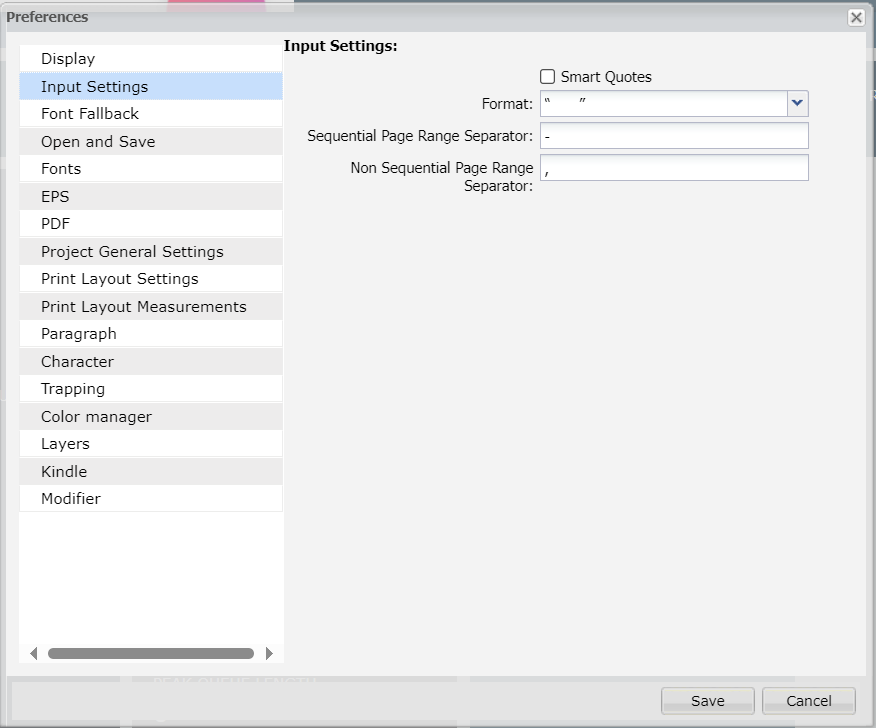
Note : If user uses smart quotes in Quark XML Author, then user will get smart quote in the output, even if Smart Quotes preferences is unchecked in Preferences.
To avoid smart quotes in Quark XML Author, user can follow below steps:
- Open Microsoft Word Application
- Navigate to File >> Options.
- Select Proofing>> AutoCorrect Options
- Navigate to the tab "AutoFormat As You Type" and uncheck the "Straight Quotes with Smart Quotes" checkbox.
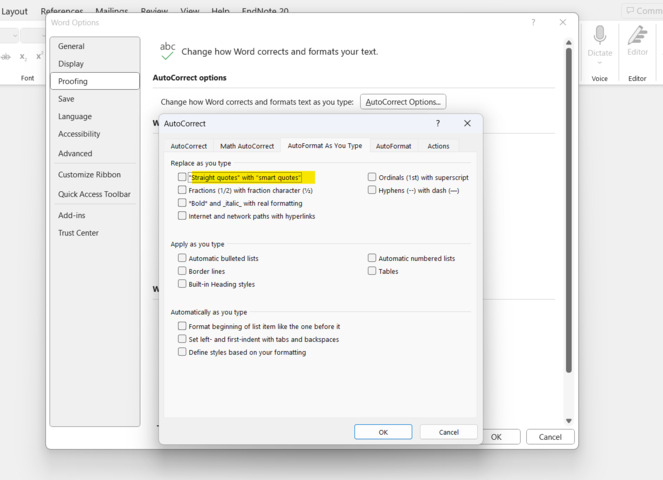
With these steps, whenever user types the quotes, it will be typed as Straight Quotes rather than Smart Quotes.
Priyanka Bhotika
Comments