Product: Quark Publishing Platform (QPP)
There are two filters available in the QPP for PDF document indexing. The default is JAWS Filter and other is ASPOSE, which can also be used for PDF indexing. In case you want to change the default filter to ASPOSE, follow the below mentioned steps:
1. Stop the QPP if already running.
2. Edit AsposeSupportedFileTypes.xml located under C:\Program Files\Quark\Quark Publishing Platform\Server\conf and un-comment the following section:
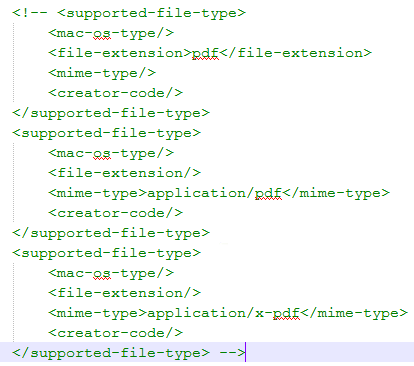
3. Save the file.
4. Edit JawsSupportedFileTypes.xml located under C:\Program Files\Quark\ Quark Publishing Platform\Server\conf and comment out the following section:
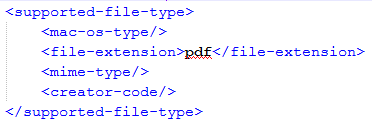
5. Save the file.
6. Start the QPP Server.
Priyanka Bhotika
Comments