Product: Quark Publishing Platform (QPP)
In order to use any third-party library or framework, we have to add their JAR files in the classpath, to compile and run our Java programs. Java project (QPP) requires JAR libraries to function, we configure project to include the libraries in its build path.
Solution:
To add JAR files to Eclipse for QPP Server, follow below steps:
- Select QPPServer project. Right click and select the properties
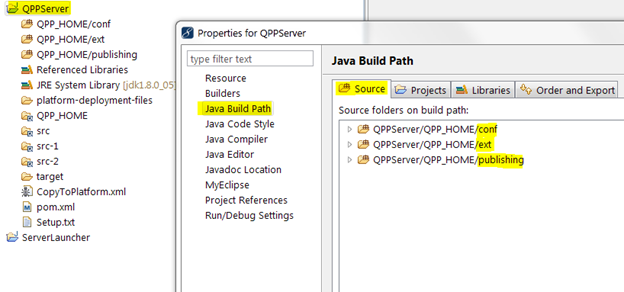
- Go to 'Java Build Path' -> 'Source'
- Add folders QPPServer/QPP_HOME/conf QPPServer/QPP_HOME/ext QPPServer/QPP_HOME/publishing
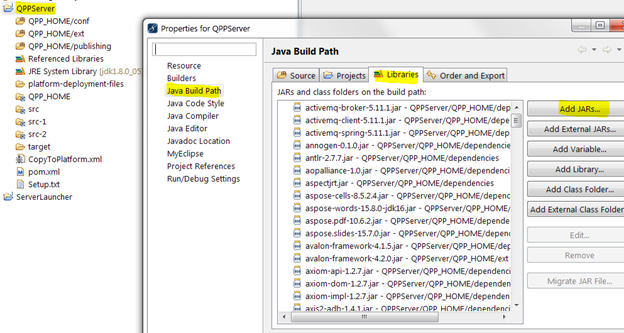
5. Make sure all jars are marked for export under Order and Export Tab 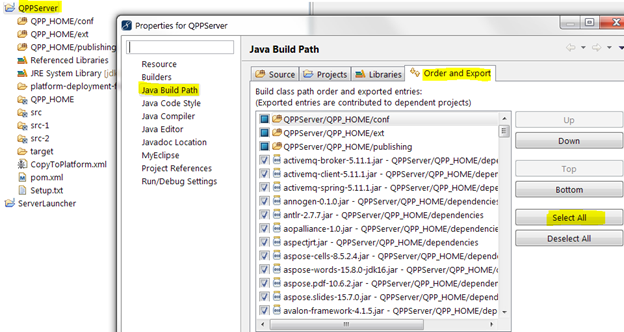
Priyanka Bhotika
Comments