Product: Quark Publishing Platform (QPP)
Perform the below steps to restrict the connection to unauthenticated connection to the JMX agent and monitor and manage the Java application that has enabled the agent.
1. Stop the server.
2. Create a password file named jmxremote.password with the following entries and save it to some location in the file system.
For example monitorRole mrpasswd
controlRole crpasswd
Note: Where monitorRole and controlRole are sample role names along with their passwords. (File attached for reference)
3. Create access file named jmxremote.access by specifying the above mentioned role names along with access privilege and save it to some location.
For example: monitorRole readonly
controlRole readwrite
4. Edit jar file {SERVER_INSTALLATION FOLDER}\lib\qxps-common-14.0.jar and make following changes in the file com\quark\qxps\common\JMXContext.xml.
- Add the following highlighted environment property in the already defined serverConnector bean as shown below:
<property name="objectName" value="connector:name=rmi"/>
<property name="serviceUrl"
value="service:jmx:rmi://${server.machinename}:${jmx.serviceport}/jndi/rmi://${server.machinename}:${rmi.port}/jmxrmi"/>
<property name="environment">
<map>
<entry key="jmx.remote.x.password.file" value="C:\...\..\jmxremote.password"/>
<entry key="jmx.remote.x.access.file" value="C:\...\..\jmxremote.access"/>
</map>
</property>
</bean>
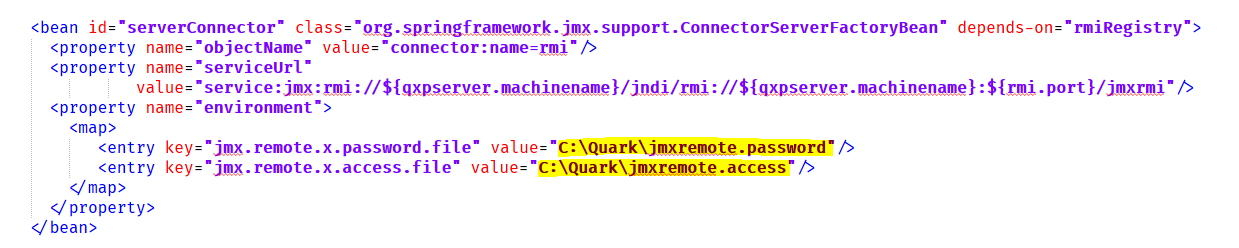
5. Start the server.
6. Now connect to JMX service through JConsole can only be made by specifying username as controlRole and password as crpasswd. It is to be observed that though we will be able to login with monitorRole as well, but operation executions are denied for users with readOnly access
Priyanka Bhotika
Comments