Product: Quark Publishing Platform (QPP)
The Promote feature allows you to promote a section of your document to a higher level. The content of the section remains unchanged, only the type and level change.
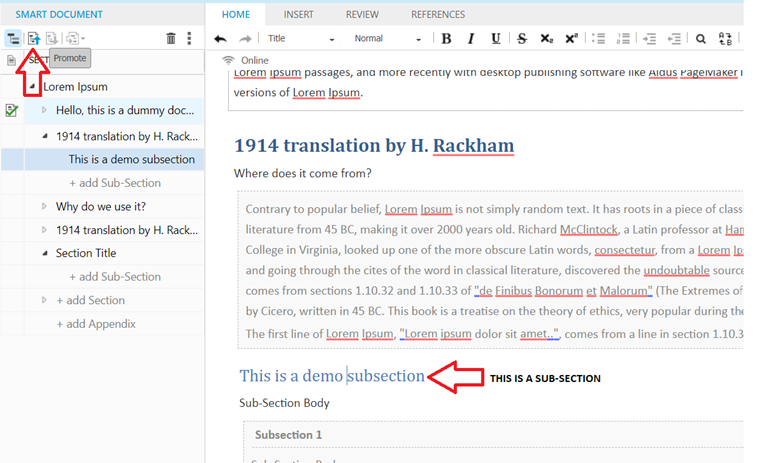
In the fig. below, cursor is placed on the title of sub-section, just when the sub-section was selected, the option of ‘Promote’ is enabled and on clicking the Promote icon (as shown in the fig. below), along with a section its sub-sections are also promoted.
The Demote feature allows you to demote sections of your document to a lower level. The demoted section will be converted to a sub-section of the previous section. The content of the section remains unchanged, only the type and level change.
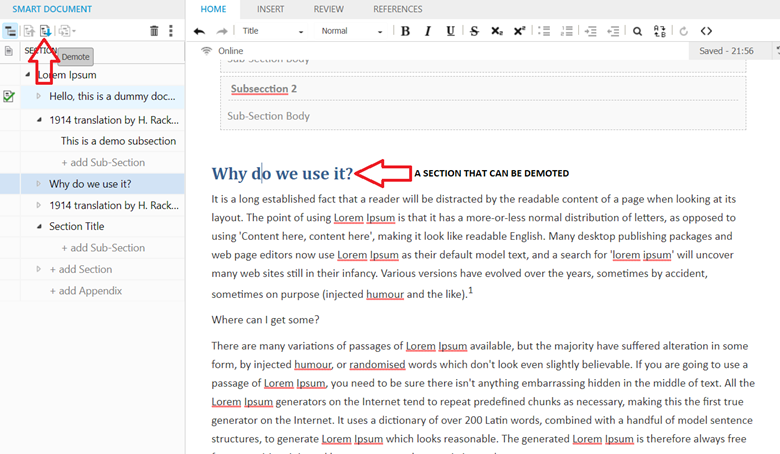
If you demote a section that has sub-sections, these sub-sections are also demoted.
If you demote a section to the lowest level of your content model and it contains sub-sections, the content of these sub-sections will change to regions. These generic regions appear in the Para Styles drop-down menu with the new type Region.
Priyanka Bhotika
Comments