Product: Quark Publishing Platform (QPP)
Follow the below steps:
Follow the below steps:
- Login to QPP Workspace ( (http://ServerName Or IP:61400/workspace))
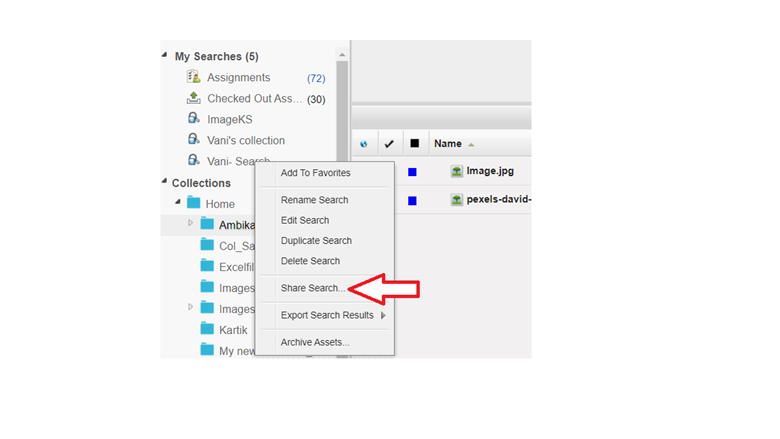
- Right Click on the existing Search in the QPP Workspace
Click on ‘Share Search’ option from the Context Menu that appears
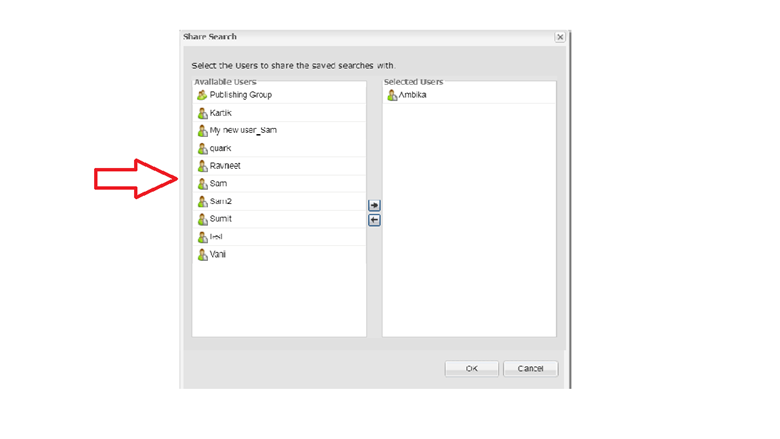
- From the window that appears upon click ‘Share Search’, select users from the list of ‘Available’ Users and add to ‘Selected Users
’. - Once the choice of users has been selected, Click ‘OK’. The assigned user will be able to see the shared Search in the respective Workspace.
Priyanka Bhotika
Comments