Product: Quark Publishing Platform (QPP)
Solution:
To specify asset revision parameters for a collection:
- Login to QPP Workspace. ( (http://ServerName Or IP:61400/workspace))
- In the Workflow navigation pane, right-click the collection and choose Edit Collection. The Edit Collection dialog box displays.
- Click Revision Controls. The Revision Controls pane displays.
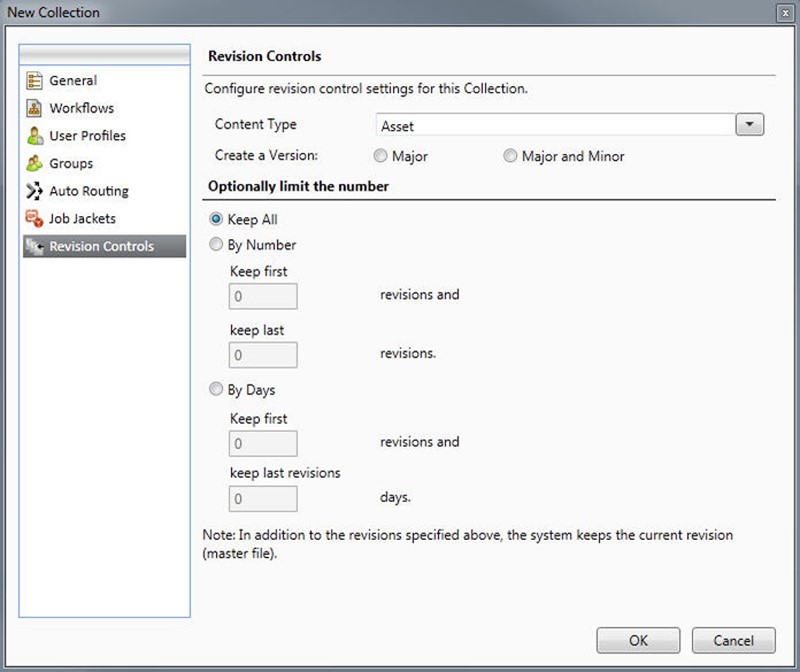
- You can specify different parameters for different file types. For example, you might choose to retain all versions of text files because they have relatively small file sizes, but you might save only the original picture and the most recent revision for larger picture files. Choose an option from the Asset Type drop-down menu.
- To control the default versioning for asset check-in, click Major or Major and Minor under Create a Version.
- Configure revision settings for the chosen asset type:
- To retain every revision of the chosen asset type, click Keep All.
- To limit automatic revision retention to a specific number of early and recent versions, click By Number and then enter values in the Keep first and keep last fields.
- To limit automatic revision retention to a specific number of days, click By Days and then enter values in the Keep first and keep last fields.
Priyanka Bhotika
Comments