Product: Quark Publishing Platform (QPP)
This article will help the Administrator in removing access to viewing the collection assigned to them in QPP.
- Login to QPP - Web Admin (http://QPPServerIP:61400/admin).
- Go to Roles & Privileges and select the role for whom you would like to remove the assigned collections access.
- Go to Application Privileges > Workspace > Collections > Allow Collection Browsing.
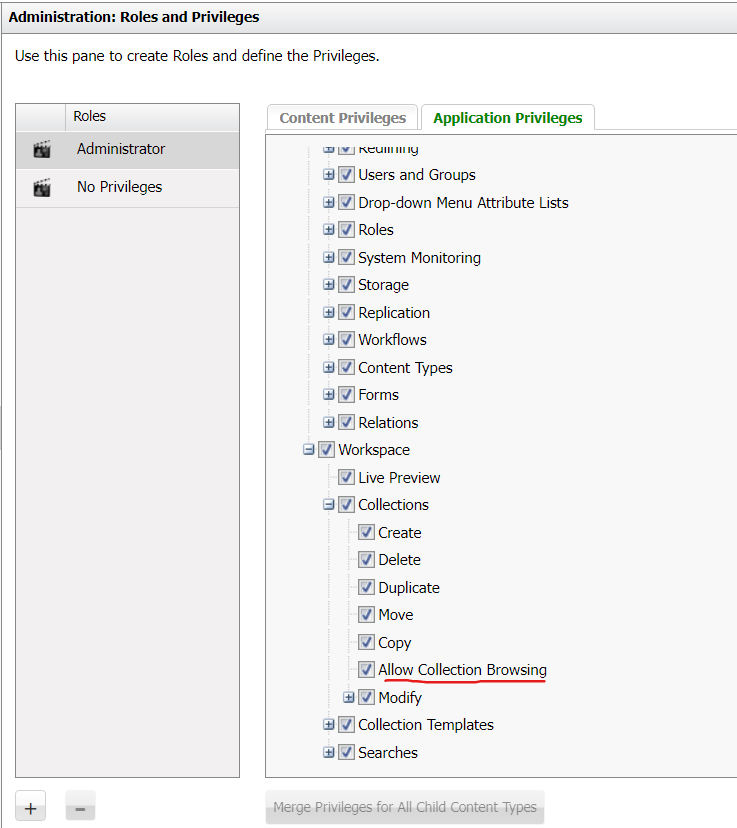
- After deselecting this option, the user with access to the role will only be able to see the assignments in the workspace client (http://QPPServerIP:61400/workspace) but they will not be able to see any collections assigned to them.
Priyanka Bhotika
Comments